Magento 2: Adding Custom Shipping Address Field Tutorial (Part 2 - Checkout)
Challenges
The process of saving custom shipping address attributes is one of the most complex aspects of Magento architecture due to system complexity, known bugs, and the substantial amount of boilerplate code required.
It is crucial to understand how Magento expects data to flow from customer interaction to the database. Here are the key points:
- Magento’s frontend and backend communicate via REST API following interfaces defined within Magento.
- We cannot extend the customer address interface by simply adding a new field such as
custom_field. Magento requires us to use extension attributes for this purpose. - The Magento frontend does not operate with extension attributes by default. Instead, all custom address attributes are treated as the
address.custom_attributesproperty. - By default, the attributes we create do not automatically populate the
address.custom_attributesproperty. Most articles addressing this issue recommend customization via LayoutProcessor to change the attribute dataScope. I refer to this as “fixing” the dataScope, as it remains unclear why this fix is necessary for every single attribute. - The Magento backend does not inherently know how or where to store extension attributes, so we need to configure Magento to handle this appropriately.
Our implementation plan consists of the following steps:
- Fix the frontend input dataScope so the selected value appears in the
address.customAttributesproperty. - Add a mixin to convert
customAttributesintoextension_attributesbefore submitting the shipping address to the backend. - Define a new customer address extension attribute so Magento recognizes it.
- Add handler(s) to convert the extension attribute into an Address property.
- Add a field to the
quote_addresstable to persist this property.
At this stage, we need to configure Magento 2 to save this field to the quote whenever a customer selects an option during the checkout process. First, we will add a new field to the quote_address table where our custom field will be stored.
Step 1. Fix Frontend Input dataScope
Despite Magento having an instrument to separate custom attributes, it is not utilized when Magento builds the jsLayout for these fields. As shown in \Magento\Checkout\Block\Checkout\AttributeMerger::getFieldConfig, the dataScope is always constructed as $dataScopePrefix . '.' . $attributeCode. Consequently, for a shipping address form, the dataScope would be shippingAddress.custom_field instead of the expected shippingAddress.custom_attributes.custom_field.
Let’s add a plugin to correct this issue.
First, we need to add a dependency on the Magento_Checkout module.
File: etc/module.xml
<?xml version = "1.0"?>
<config xmlns:xsi="http://www.w3.org/2001/XMLSchema-instance" xsi:noNamespaceSchemaLocation="urn:magento:framework:Module/etc/module.xsd">
    <module name="SergiyNezbritskiy_CustomAddressField" setup_version="1.0.0">
        <sequence>
            <module name="Magento_Customer"/>
            <module name="Magento_Checkout"/> <!-- This is what we've added -->
        </sequence>
    </module>
</config>
Define our plugin in di.xml:
File: etc/di.xml
<?xml version="1.0"?>
<config xmlns:xsi="http://www.w3.org/2001/XMLSchema-instance" xsi:noNamespaceSchemaLocation="urn:magento:framework:ObjectManager/etc/config.xsd">
    <type name="\Magento\Checkout\Block\Checkout\AttributeMerger">
        <plugin name="sn_fix_data_scope" type="SergiyNezbritskiy\CustomAddressField\Plugin\Checkout\AttributeMergerPlugin"/>
    </type>
</config>
Within the plugin, fix the dataScope for our attribute:
File: Plugin/Checkout/AttributeMergerPlugin.php
<?php

declare(strict_types=1);

namespace SergiyNezbritskiy\CustomAddressField\Plugin\Checkout;

use Magento\Checkout\Block\Checkout\AttributeMerger;

class AttributeMergerPlugin
{
    /**
     * @see AttributeMerger::merge
     */
    public function afterMerge(AttributeMerger $subject, array $result, array $elements, string $providerName, string $dataScopePrefix, array $fields): array
    {
        if (array_key_exists('custom_field', $result)) {
            $oldScope = $result['custom_field']['dataScope'];
            $newScope = str_replace('custom_field', 'custom_attributes.custom_field', $oldScope);
            $result['custom_field']['dataScope'] = $newScope;
        }
        return $result;
    }
}
This fix applies the dataScope correction for every address on the checkout page, including shippingAddress and billingAddresses (there are multiple billing addresses, as each payment method has its own UI component). You can add a breakpoint in this plugin to observe the execution flow.
Now, let’s flush the cache:
php bin/magento cache:flush
Verification
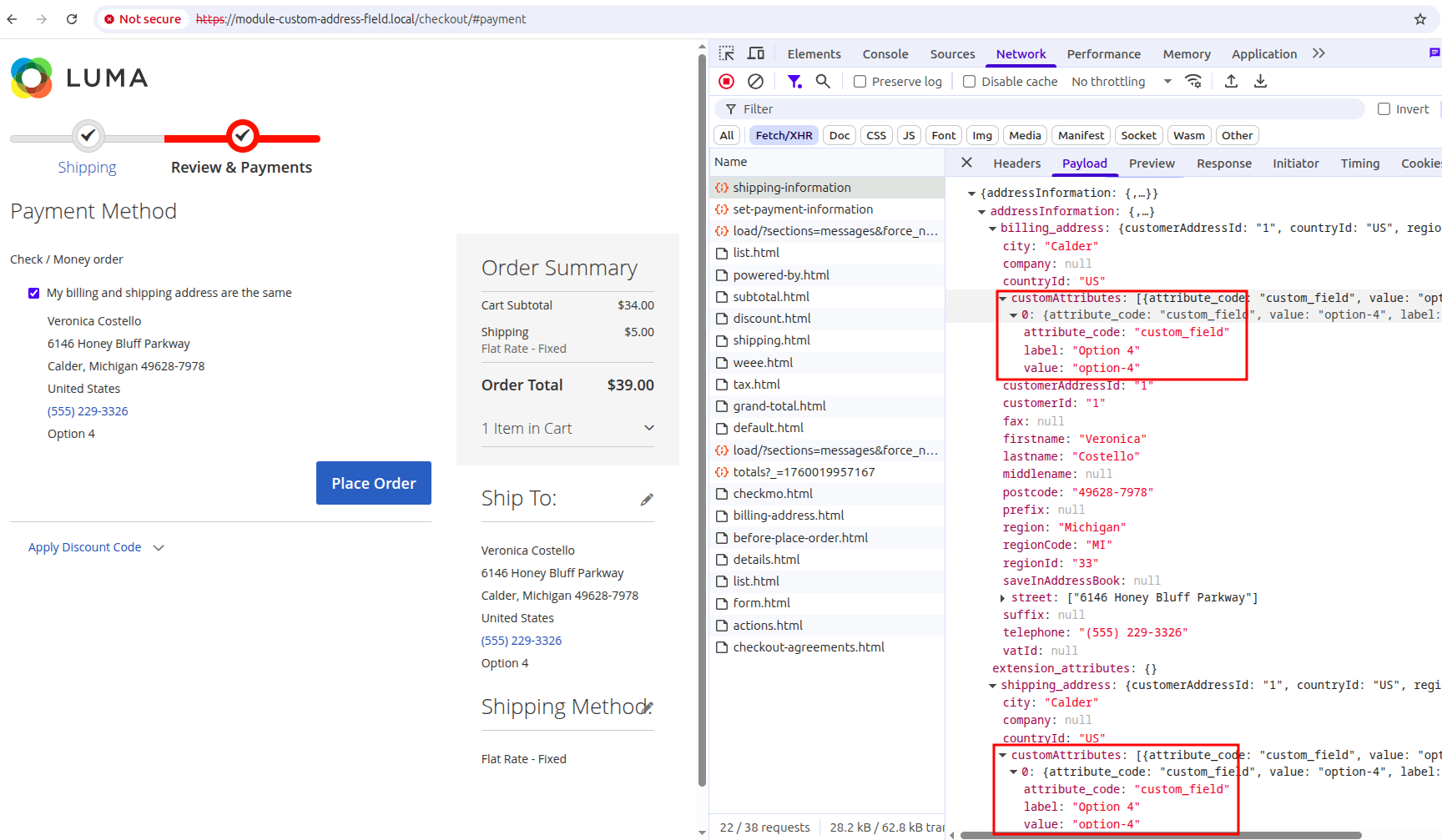
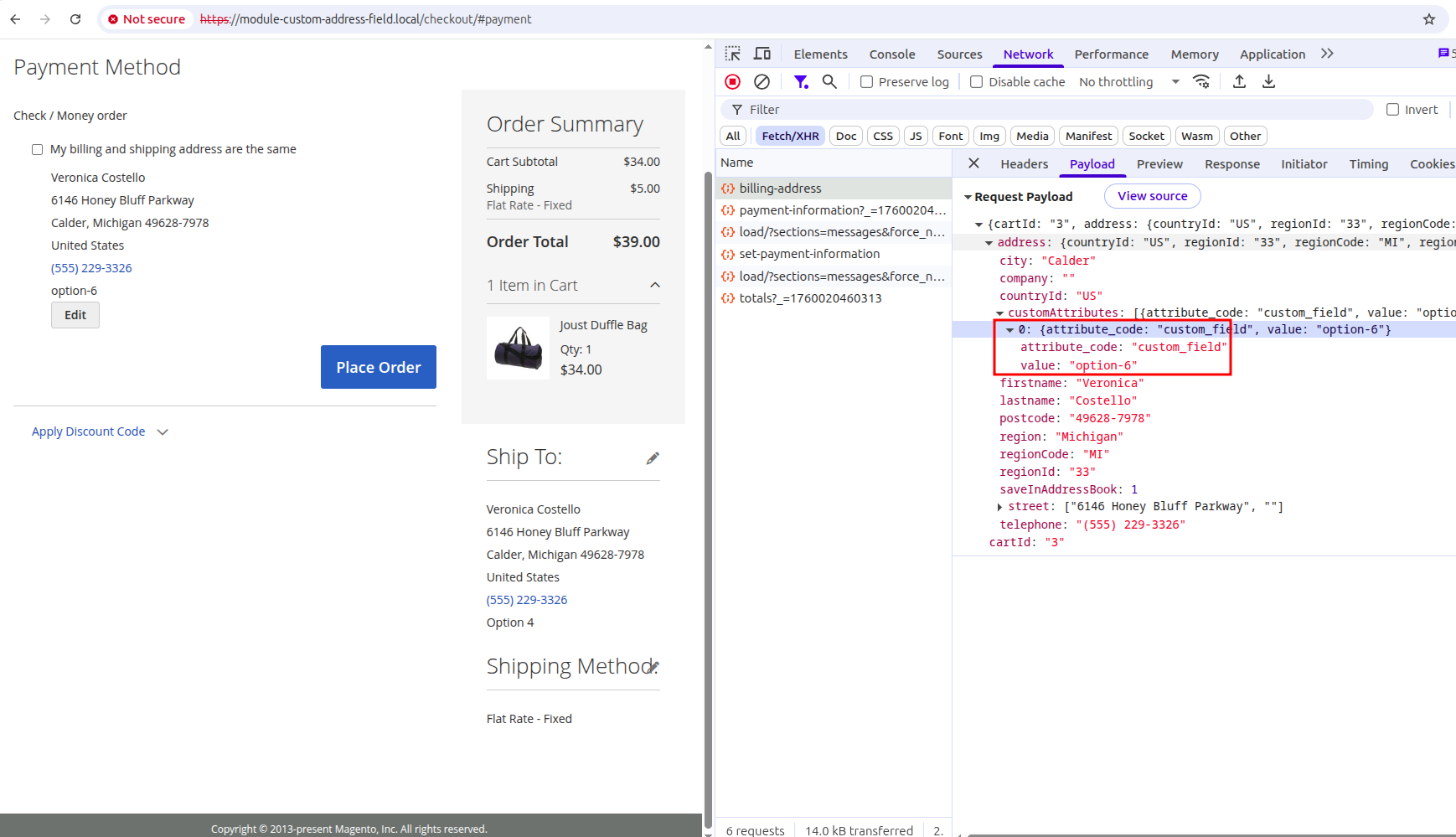
At this point, whenever an address is sent to the backend, you should be able to see the attribute value within the customAttributes property. For example:
When pressing “Next” on the shipping step:
When saving the billing address:
Step 1.1. Fix Attribute Option Label
This is not part of our main flow, but you may have noticed that after saving the billing address, our option is displayed as an option ID instead of its label.
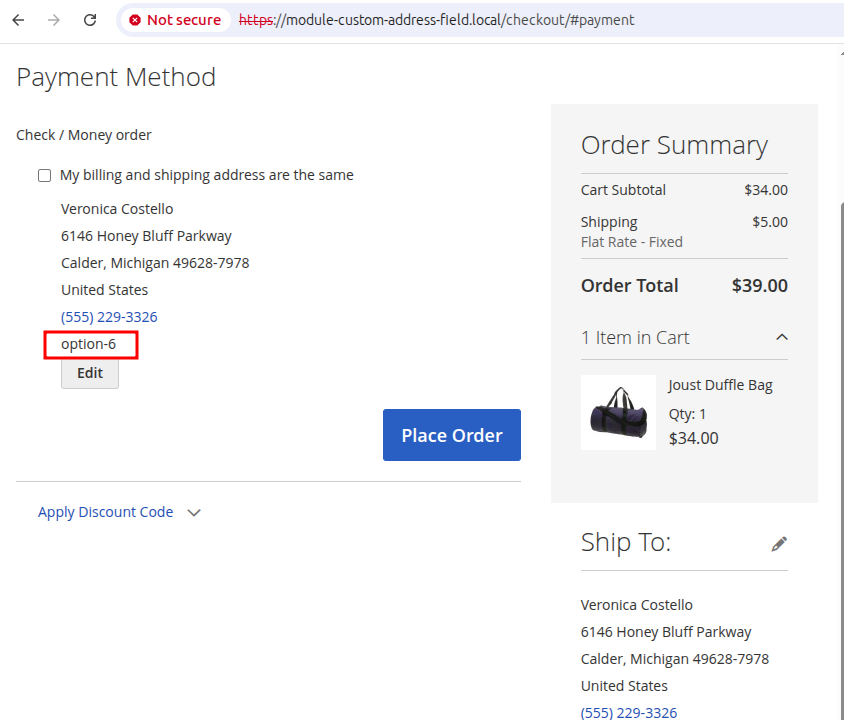
This occurs because customAttributes properties do not store labels (though they occasionally do, but typically do not). Magento expects us to define all labels for all options within the checkoutProvider UI component. We can push these options using the plugin we have already introduced.
File: Plugin/Checkout/AttributeMergerPlugin.php
<?php

declare(strict_types=1);

namespace SergiyNezbritskiy\CustomAddressField\Plugin\Checkout;

use Magento\Checkout\Block\Checkout\AttributeMerger;

class AttributeMergerPlugin
{
    /**
     * @see AttributeMerger::merge
     */
    public function afterMerge(AttributeMerger $subject, array $result, array $elements, string $providerName, string $dataScopePrefix, array $fields): array
    {
        if (array_key_exists('custom_field', $result)) {
            $oldScope = $result['custom_field']['dataScope'];
            $newScope = str_replace('custom_field', 'custom_attributes.custom_field', $oldScope);
            $result['custom_field']['dataScope'] = $newScope;
            $result['custom_field']['exports']['options']='checkoutProvider:customAttributes.custom_field'; //this line has been added
        }
        return $result;
    }
}
Verification
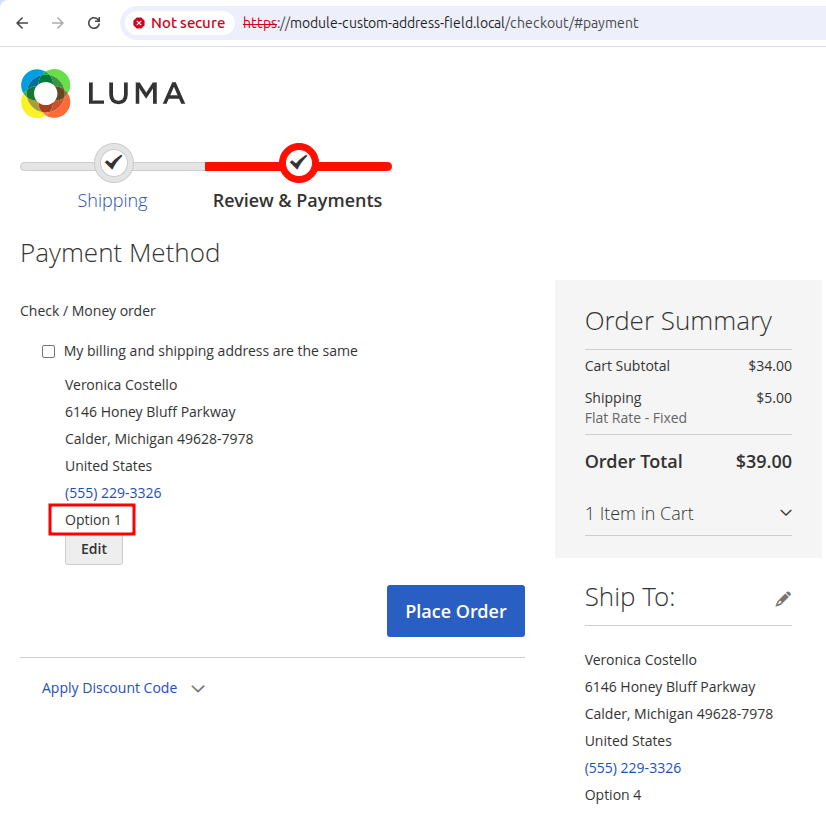
The display should now be correct:
Step 2. Convert customAttributes into extension_attributes
This can be achieved by adding mixins to actions that handle addresses. While I have seen implementations for other actions, these two are sufficient for our purposes:
Magento_Checkout/js/action/set-shipping-information- when proceeding to the billing stepMagento_Checkout/js/action/place-order- when placing the order
For all these actions, we need to perform the same operation: convert address.customAttributes.custom_field into address.extension_attributes.custom_field. Let’s implement a reusable model for all mixins to avoid code duplication.
File: view/frontend/web/js/model/extension-attribute-processor.js
define([
    'jquery'
], function ($) {

    'use strict';

    return function (attributeCode, address) {
        if (address['extension_attributes'] === undefined) {
            address['extension_attributes'] = {};
        }

        if (address['customAttributes'] === undefined) {
            address['customAttributes'] = {};
        }

        $.each(address['customAttributes'], function (key, value) {
            if ($.isPlainObject(value)) {
                key = value['attribute_code'];
                value = value['value'];
            }
            if (key === attributeCode) {
                address['extension_attributes'][attributeCode] = value;
                return false;
            }
        });

    };
});
Now add our mixins through requirejs-config.js:
File: view/frontend/web/requirejs-config.js
let config = {
    config: {
        mixins: {
            'Magento_Checkout/js/action/set-shipping-information': {
                'SergiyNezbritskiy_CustomAddressField/js/action/set-extension-attributes-mixin': true
            },
            'Magento_Checkout/js/action/place-order': {
                'SergiyNezbritskiy_CustomAddressField/js/action/set-extension-attributes-mixin': true
            }
        }
    }
};
File: view/frontend/web/js/action/set-extension-attributes-mixin.js
define([
    'mage/utils/wrapper',
    'Magento_Checkout/js/model/quote',
    'SergiyNezbritskiy_CustomAddressField/js/model/extension-attribute-processor'
], function (wrapper, quote, processExtensionAttribute) {
    'use strict';

    return function (setShippingInformationAction) {

        return wrapper.wrap(setShippingInformationAction, function (originalAction) {

            let shippingAddress = quote.shippingAddress();
            processExtensionAttribute('custom_field', shippingAddress);

            let billingAddress = quote.billingAddress();
            processExtensionAttribute('custom_field', billingAddress);

            return originalAction();
        });
    };
});
Verification
At this point, you should be able to see that the Magento frontend is sending extension attributes to the backend.
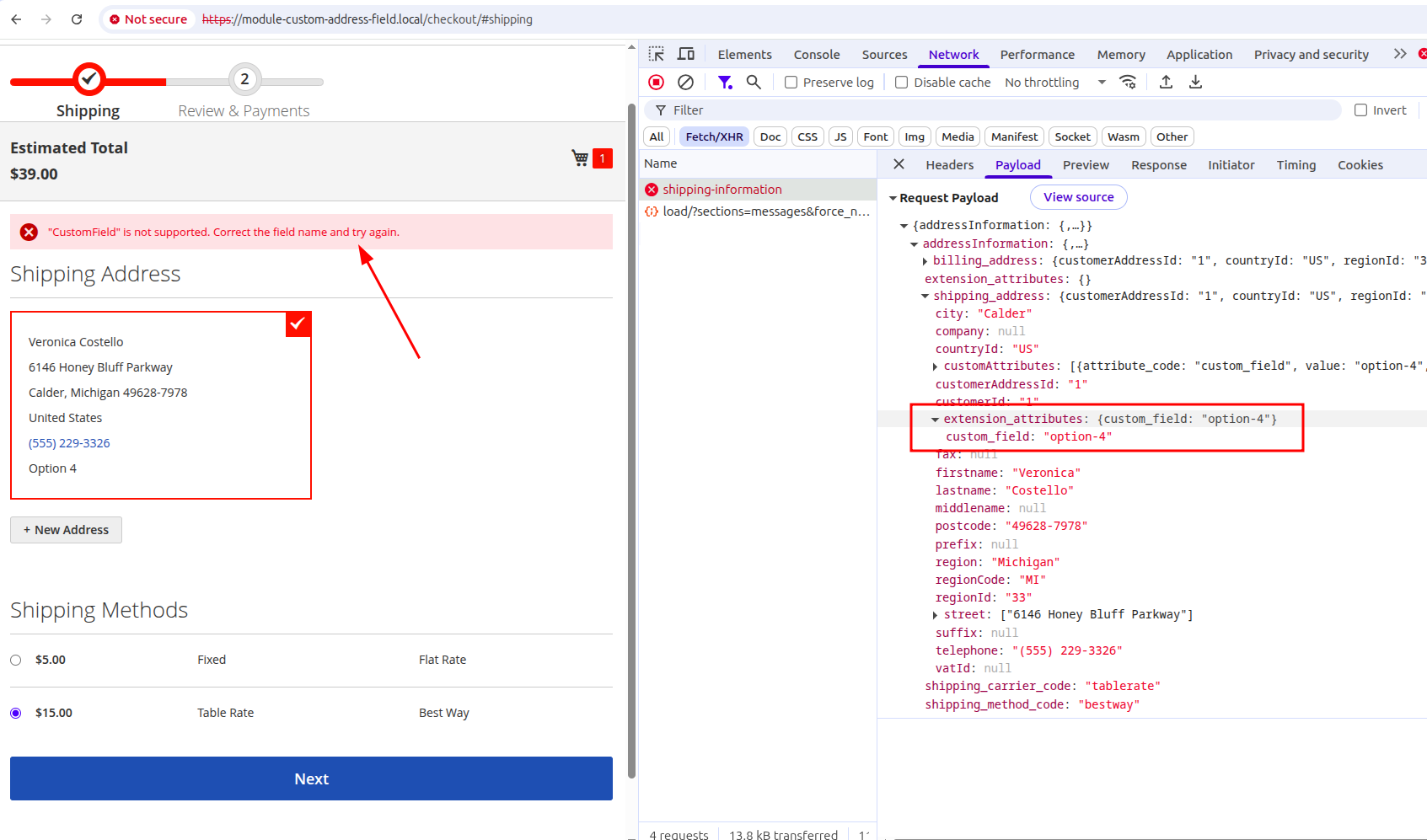
However, the backend will now return an error stating that CustomField is not supported. This is expected because we have not yet registered this extension attribute. Let’s proceed to the next step to resolve this.
Step 3. Define Extension Attribute
For this, we simply need to add an etc/extension_attributes.xml file. Before doing so, let’s add the Magento_Quote module to the sequence:
File: etc/module.xml
<?xml version = "1.0"?>
<config xmlns:xsi="http://www.w3.org/2001/XMLSchema-instance" xsi:noNamespaceSchemaLocation="urn:magento:framework:Module/etc/module.xsd">
    <module name="SergiyNezbritskiy_CustomAddressField" setup_version="1.0.0">
        <sequence>
            <module name="Magento_Customer"/>
            <module name="Magento_Checkout"/>
            <module name="Magento_Quote"/><!-- this line has been added -->
        </sequence>
    </module>
</config>
File: etc/extension_attributes.xml
<?xml version="1.0" ?>
<config xmlns:xsi="http://www.w3.org/2001/XMLSchema-instance" xsi:noNamespaceSchemaLocation="urn:magento:framework:Api/etc/extension_attributes.xsd">
    <extension_attributes for="Magento\Quote\Api\Data\AddressInterface">
        <attribute code="custom_field" type="string"/>
    </extension_attributes>
</config>
After changing the sequence and defining new extension attributes, we need to run the setup:upgrade command:
php bin/magento setup:upgrade
Verification
First, the frontend error should be resolved. Additionally, the QuoteAddressInterface should be generated with setCustomField and getCustomField methods. Check the generated/code/Magento/Quote/Api/Data/AddressExtensionInterface.php file, which should contain the following:
/**
 * @return string|null
 */
public function getCustomField();

/**
 * @param string $customField
 * @return $this
 */
public function setCustomField($customField);
Step 4. Convert Extension Attribute into Address Data
At this point, if we set a breakpoint in the \Magento\Checkout\Model\ShippingInformationManagement::saveAddressInformation method and submit the checkout shipping step, we can see that $addressInformation contains our extension attribute. Our goal is to make Magento convert it into address data every time the Address object is initialized or extension attributes are set.
There are several scenarios for initializing a Quote\Address object with extension_attributes:
- We can create an object and call
setExtensionAttributes - We can create an object and call
setDatawith an array argument containingextension_attributesor with the keyextension_attributes - We can pass
$datawithextension_attributesas an argument to the constructor. In this case, thesetDatamethod will be called during object initialization as well.
Therefore, we need to add plugins for the setExtensionAttributes and setData methods to cover all possible scenarios.
Additionally, let’s ensure that every time we retrieve extension attributes, our custom_field is always present. We’ll add an after plugin for the getExtensionAttributes method.
File: etc/di.xml
<?xml version="1.0"?>
<config xmlns:xsi="http://www.w3.org/2001/XMLSchema-instance" xsi:noNamespaceSchemaLocation="urn:magento:framework:ObjectManager/etc/config.xsd">
    <type name="\Magento\Checkout\Block\Checkout\AttributeMerger">
        <plugin name="sn_fix_data_scope" type="SergiyNezbritskiy\CustomAddressField\Plugin\Checkout\AttributeMergerPlugin"/>
    </type>
    <!-- This plugin has been added -->
    <type name="\Magento\Quote\Model\Quote\Address">
        <plugin name="sn_convert_extension_attributes" type="SergiyNezbritskiy\CustomAddressField\Plugin\Quote\AddressPlugin"/>
    </type>
</config>
File: Plugin/Quote/AddressPlugin.php
<?php

declare(strict_types=1);

namespace SergiyNezbritskiy\CustomAddressField\Plugin\Quote;

use Magento\Quote\Api\Data\AddressExtension;
use Magento\Quote\Api\Data\AddressExtensionInterface;
use Magento\Quote\Api\Data\AddressExtensionInterfaceFactory;
use Magento\Quote\Model\Quote\Address;

readonly class AddressPlugin
{
    public function __construct(private AddressExtensionInterfaceFactory $factory)
    {
    }

    /**
     * @see Address::setData()
     */
    public function afterSetData(Address $subject, Address $result, $key, $value = null): Address
    {
        if (is_array($key) && array_key_exists('extension_attributes', $key)) {
            /** @var AddressExtensionInterface $value */
            $value = $key['extension_attributes'];
            $key = 'extension_attributes';
        }

        if ($key === 'extension_attributes') {
            $this->convert($result, $value);
        }
        return $result;
    }

    /**
     * @see Address::setExtensionAttributes()
     */
    public function afterSetExtensionAttributes(Address $subject, Address $result, AddressExtensionInterface $extensionAttributes): Address
    {
        $this->convert($result, $extensionAttributes);
        return $result;
    }

    /**
     * @see Address::getExtensionAttributes()
     */
    public function afterGetExtensionAttributes(Address $subject, ?AddressExtensionInterface $result): ?AddressExtensionInterface
    {
        if (!$result || !$result->getCustomField()) {
            $customField = $subject->getData('custom_field');
            if ($customField) {
                $result = $this->ensureExtensionAttributes($result);
                $result->setCustomField($customField);
            }
        }
        return $result;
    }

    private function convert(Address $result, AddressExtensionInterface $extensionAttributes): void
    {
        $newValue = $extensionAttributes->getCustomField();
        if ($newValue) {
            $result->setData('custom_field', $newValue);
        }
    }

    private function ensureExtensionAttributes(?AddressExtensionInterface $result): ?AddressExtensionInterface
    {
        if (!$result) {
            $result = $this->factory->create();
        }
        return $result;
    }
}
Now, if we navigate to \Magento\Webapi\Controller\Rest\SynchronousRequestProcessor::process and set a breakpoint after $inputParams are resolved, we should see that $inputParams[1]->_data["shipping_address"]->_data["custom_field"] is set.
Step 5. Add Field to quote_address Table
The final step is to persist this address data to the database. Let’s add the corresponding field:
File: etc/db_schema.xml
<?xml version="1.0"?>
<schema xmlns:xsi="http://www.w3.org/2001/XMLSchema-instance" xsi:noNamespaceSchemaLocation="urn:magento:framework:Setup/Declaration/Schema/etc/schema.xsd">
    <table name="quote_address">
        <column xsi:type="varchar" name="custom_field" nullable="true" length="255" comment="Custom Address Field"/>
    </table>
</schema>
Upgrade the database:
php bin/magento setup:upgrade
Verification
At this moment, you should be able to see your field in the quote_address table, and the data should be written to quote_address.custom_field while processing the order. After placing the order, both addresses should have this value populated.