Magento 2: Adding a Custom Shipping Address Field Tutorial (Part 1 - Defining the Attribute)
At first glance, adding a custom attribute to a customer address in Magento 2 seems like it should be straightforward. In reality, it’s anything but. Even a task that sounds trivial quickly becomes complex: you need to write a lot of boilerplate code, deal with quirks and bugs, and carefully specify each step - often with no clear guidance on where or how to implement it. Debugging is almost inevitable, and it can feel like every action requires painstaking attention.
This article guides you through the full process of implementing a custom customer address attribute in Magento 2. Divided into three parts, it covers everything from defining the attribute and adding options to making it visible and functional across checkout, order details, and the customer account dashboard.
Of course, if you’d rather skip the long setup, there’s a shortcut: you can download the ready-made module here, rename the custom_field attribute to whatever you need, maybe add some adjustments, and it’s ready to go. But for those who want to understand the “why” and “how”, this guide walks through every necessary step.
Prerequisites
For this tutorial, we’ll need a vanilla Magento 2 installation with sample data. All filenames are relative to app/code/SergiyNezbritskiy/CustomShippingAddress.
Task
A custom address attribute must be added to the customer address entity. The attribute should be a required dropdown field populated with a predefined list of options. It must be displayed consistently across all relevant areas of the storefront and admin interface, including checkout, order details, and the customer account dashboard.
Step 1. Create a Module
Create a module named SergiyNezbritskiy_CustomAddressField.
File: registration.php
<?php

declare(strict_types=1);

use Magento\Framework\Component\ComponentRegistrar;

ComponentRegistrar::register(ComponentRegistrar::MODULE, 'SergiyNezbritskiy_CustomAddressField', __DIR__);
File: etc/module.xml
<?xml version="1.0"?>
<config xmlns:xsi="http://www.w3.org/2001/XMLSchema-instance" xsi:noNamespaceSchemaLocation="urn:magento:framework:Module/etc/module.xsd">
    <module name="SergiyNezbritskiy_CustomAddressField" setup_version="1.0.0"/>
</config>
Now enable the module:
php bin/magento setup:upgrade
Verification
You should see the module listed and enabled in app/etc/config.php, for example:
<?php
return [
    'modules' => [
        // Other modules in your project
        'SergiyNezbritskiy_CustomAddressField' => 1,
        // Other modules in your project
    ]
];
Step 2. Create the Shipping Address Attribute
Add a module dependency for Magento_Customer in module.xml.
File: etc/module.xml
<?xml version = "1.0"?>
<config xmlns:xsi="http://www.w3.org/2001/XMLSchema-instance" xsi:noNamespaceSchemaLocation="urn:magento:framework:Module/etc/module.xsd">
    <module name="SergiyNezbritskiy_CustomAddressField" setup_version="1.0.0">
        <sequence>
            <module name="Magento_Customer"/>
        </sequence>
    </module>
</config>
Create a source model for the attribute options.
File: Model/Address/Attribute/Source/CustomField.php
<?php

declare(strict_types=1);

namespace SergiyNezbritskiy\CustomAddressField\Model\Address\Attribute\Source;

use Magento\Eav\Model\Entity\Attribute\Source\AbstractSource;

class CustomField extends AbstractSource
{
    public function getAllOptions(): array
    {
        return [];
    }
}
Next, create a data patch to define the attribute.
File: Setup/Patch/Data/CreateShippingAttribute.php
<?php

declare(strict_types=1);

namespace SergiyNezbritskiy\CustomAddressField\Setup\Patch\Data;

use Magento\Customer\Model\Indexer\Address\AttributeProvider;
use Magento\Customer\Setup\CustomerSetup;
use Magento\Eav\Model\AttributeRepository;
use Magento\Eav\Model\Entity\Attribute\ScopedAttributeInterface;
use Magento\Framework\Setup\ModuleDataSetupInterface;
use Magento\Framework\Setup\Patch\DataPatchInterface;
use Magento\Framework\Setup\Patch\PatchRevertableInterface;
use SergiyNezbritskiy\CustomAddressField\Model\Address\Attribute\Source\CustomField;

readonly class CreateShippingAttribute implements DataPatchInterface, PatchRevertableInterface
{
    private const string ATTRIBUTE_CODE = 'custom_field';

    public function __construct(
        private ModuleDataSetupInterface $moduleDataSetup,
        private CustomerSetup            $customerSetup,
        private AttributeRepository      $attributeRepository
    ) {}

    public static function getDependencies(): array
    {
        return [];
    }

    public function getAliases(): array
    {
        return [];
    }

    public function apply(): DataPatchInterface
    {
        $this->moduleDataSetup->getConnection()->startSetup();

        $this->saveAttribute();

        $this->moduleDataSetup->getConnection()->endSetup();

        return $this;
    }

    private function saveAttribute(): void
    {
        $definition = [
            'type' => 'varchar',
            'label' => 'Custom Field',
            'input' => 'select',
            'required' => true,
            'system' => false,
            'sort_order' => 1,
            'position' => 1,
            'is_used_in_grid' => true,
            'is_visible_in_grid' => true,
            'is_filterable_in_grid' => true,
            'is_searchable_in_grid' => true,
            'source' => CustomField::class,
            'global' => ScopedAttributeInterface::SCOPE_GLOBAL,
        ];

        $connection = $this->moduleDataSetup->getConnection();

        $this->customerSetup->addAttribute(AttributeProvider::ENTITY, self::ATTRIBUTE_CODE, $definition);

        $attribute = $this->customerSetup->getEavConfig()->getAttribute(AttributeProvider::ENTITY, self::ATTRIBUTE_CODE);

        $customerFormsTable = $connection->getTableName('customer_form_attribute');
        $connection->insertMultiple($customerFormsTable, [
            ['form_code' => 'adminhtml_customer_address', 'attribute_id' => $attribute->getAttributeId()],
            ['form_code' => 'customer_address_edit', 'attribute_id' => $attribute->getAttributeId()],
            ['form_code' => 'customer_register_address', 'attribute_id' => $attribute->getAttributeId()],
        ]);
    }

    public function revert(): void
    {
        $attribute = $this->customerSetup->getEavConfig()->getAttribute(AttributeProvider::ENTITY, self::ATTRIBUTE_CODE);
        $this->attributeRepository->delete($attribute);
    }
}
Apply the patch:
php bin/magento setup:upgrade
After this, you should see the new attribute in the Admin Dashboard on the Create/Edit Address form:
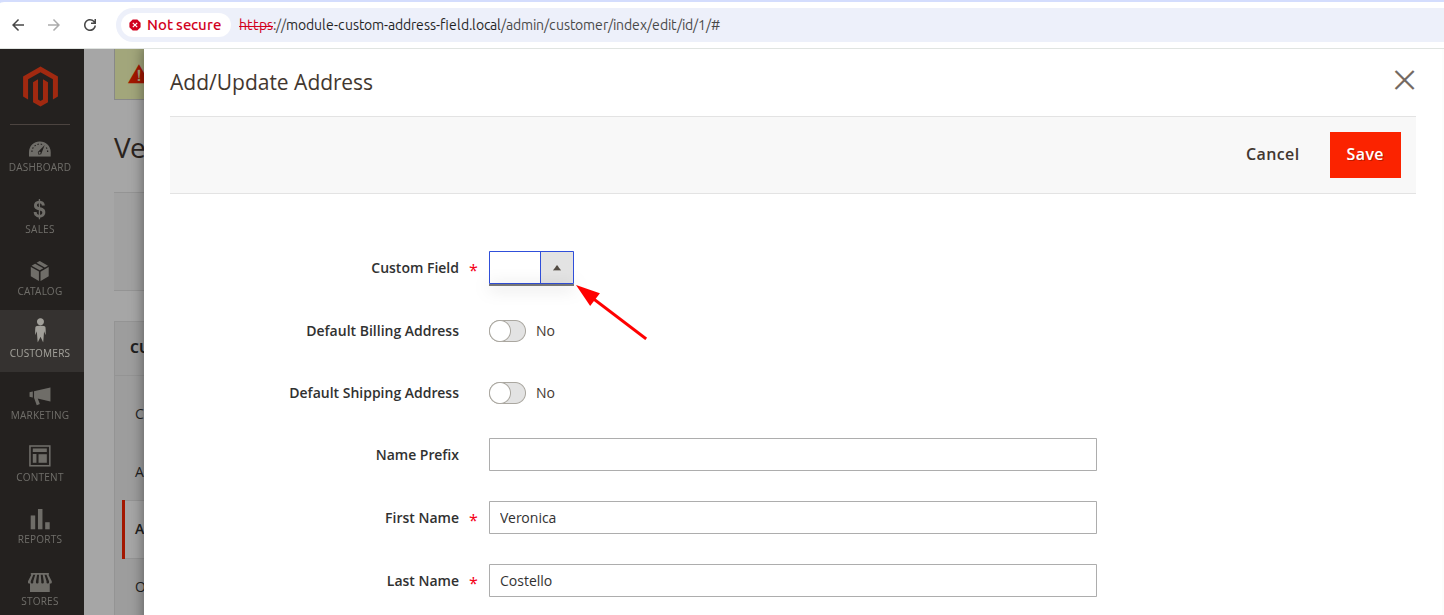
Now let’s add some options to the attribute source file.
File: Model/Address/Attribute/Source/CustomField.php
<?php

declare(strict_types=1);

namespace SergiyNezbritskiy\CustomAddressField\Model\Address\Attribute\Source;

use Magento\Eav\Model\Entity\Attribute\Source\AbstractSource;

class CustomField extends AbstractSource
{
    public function getAllOptions(): array
    {
        $result = [];
        $result[] = [
            'value' => '',
            'label' => __('Select Custom Field')
        ];
        $result[] = [
            'value' => 'option-1',
            'label' => __('Option 1')
        ];
        $result[] = [
            'value' => 'option-2',
            'label' => __('Option 2')
        ];
        $result[] = [
            'value' => 'option-3',
            'label' => __('Option 3')
        ];
        $result[] = [
            'value' => 'option-4',
            'label' => __('Option 4')
        ];
        $result[] = [
            'value' => 'option-5',
            'label' => __('Option 5')
        ];
        $result[] = [
            'value' => 'option-6',
            'label' => __('Option 6')
        ];
        return $result;
    }
}
Verification
Now the field should be fully functioning in the admin dashboard:
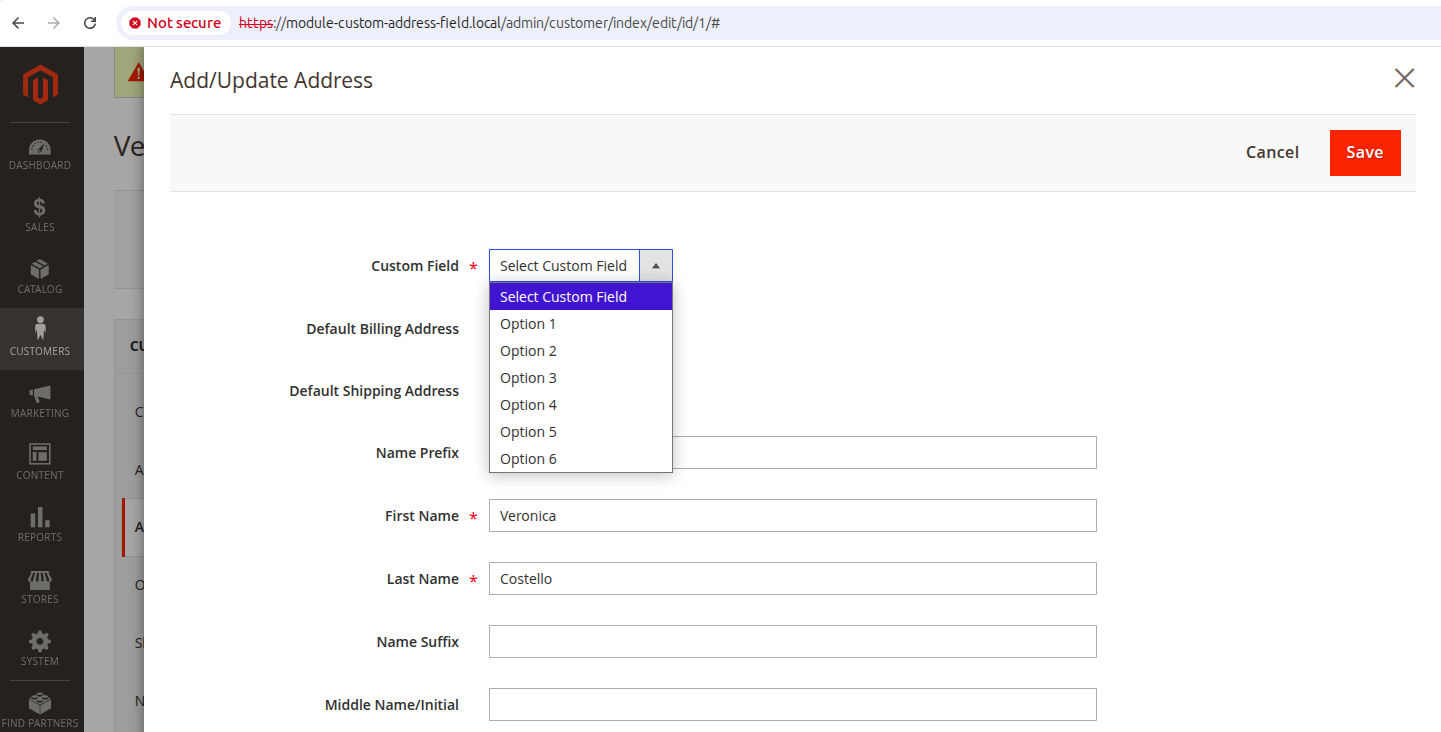
The field should be saved into customer_address_entity_varchar table. You can check it by running next SQL query:
select *
from customer_address_entity_varchar
where attribute_id = (select attribute_id
                      from eav_attribute
                      where 'custom_field' = attribute_code)
This is what you expect to see:
+----------+--------------+-----------+----------+
| value_id | attribute_id | entity_id | value    |
+----------+--------------+-----------+----------+
|        1 |          157 |         1 | option-4 |
+----------+--------------+-----------+----------+
Step 3. Make the customer address field visible in the address
The address template can be configured in Admin Dashboard: Stores -> Settings -> Configuration -> Customers -> Customer Configuration -> Address Templates. You can display this data the way you need it. In out case we just append it into the end of the address block, using a patch.
File: Setup/Patch/Data/UpdateAddressTemplates.php
<?php

declare(strict_types=1);

namespace SergiyNezbritskiy\CustomAddressField\Setup\Patch\Data;

use Magento\Framework\Setup\ModuleDataSetupInterface;
use Magento\Framework\Setup\Patch\DataPatchInterface;
use Magento\Framework\App\Config\Storage\WriterInterface;
use Magento\Framework\App\Config\ScopeConfigInterface;

readonly class UpdateAddressTemplates implements DataPatchInterface
{
    public function __construct(
        private ModuleDataSetupInterface $moduleDataSetup,
        private WriterInterface          $configWriter,
        private ScopeConfigInterface     $scopeConfig
    )
    {
    }

    public function apply(): void
    {
        $this->moduleDataSetup->getConnection()->startSetup();

        // Define config paths and their appended strings
        $map = [
            'customer/address_templates/text' => '' . PHP_EOL . 'Custom Field: ',
            'customer/address_templates/oneline' => ', ',
            'customer/address_templates/html' => ' <br />',
            'customer/address_templates/pdf' => ' '.PHP_EOL.' ',
        ];

        foreach ($map as $path => $appendString) {
            $currentValue = (string)$this->scopeConfig->getValue($path);
            $newValue = rtrim($currentValue) . $appendString;
            $this->configWriter->save($path, $newValue);
        }

        $this->moduleDataSetup->getConnection()->endSetup();
    }

    public static function getDependencies(): array
    {
        return [];
    }

    public function getAliases(): array
    {
        return [];
    }
}
Apply the patch
php bin/magento setup:upgrade
php bin/magento cache:clean config
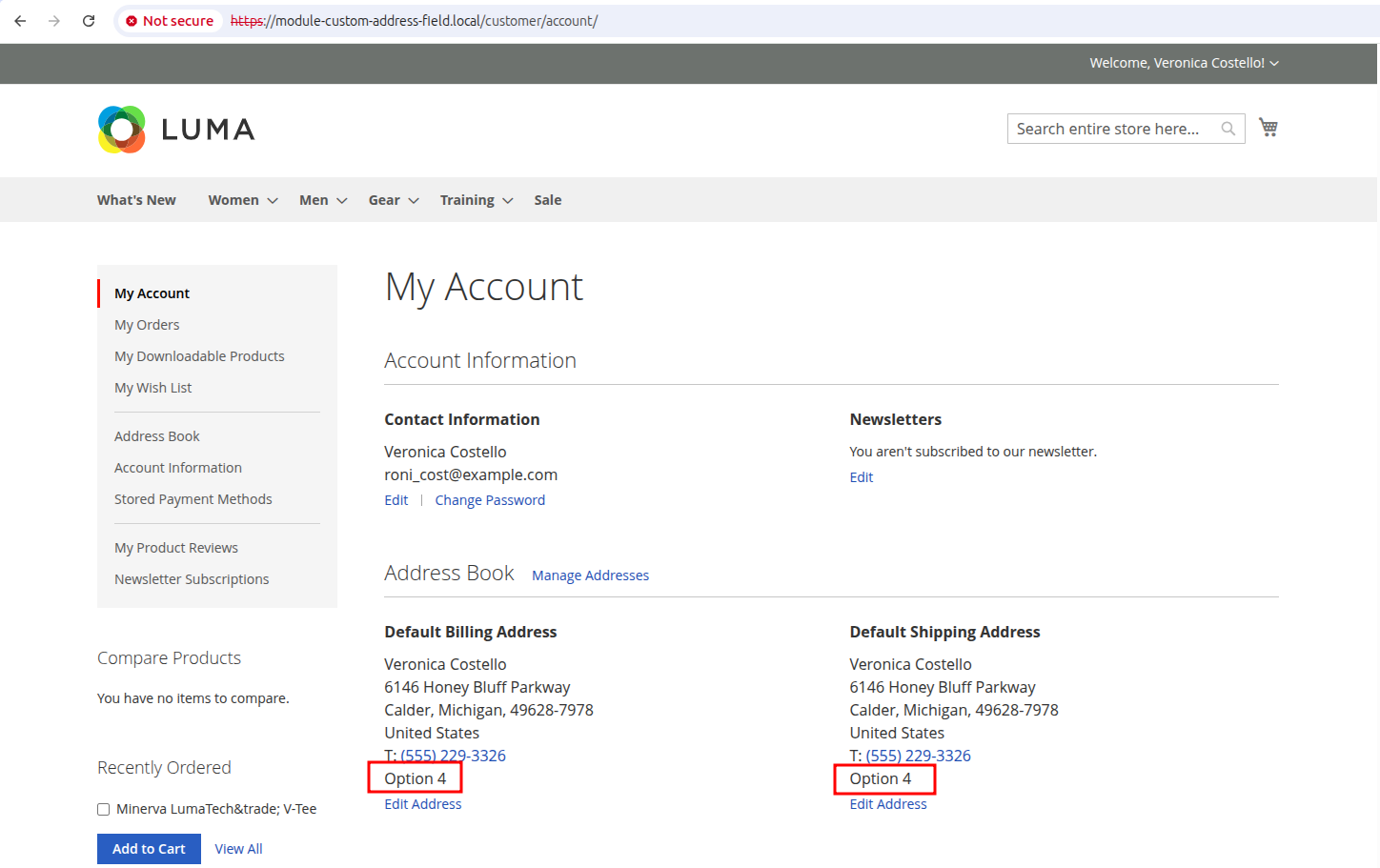
Verification:
When login to customer account you should see your field in the shipping address
Next up: in part 2, we’ll cover how to expose this field in checkout forms, customer account pages, and REST APIs.